> ## Documentation Index
> Fetch the complete documentation index at: https://alpha.developer.tomorro.com/llms.txt
> Use this file to discover all available pages before exploring further.
# Technical recipes
> Connect your own signature tool: prerequisites, the five flows and the API reference for your IT team
```mermaid theme={null}
sequenceDiagram
autonumber
actor U as Tomorro user
participant T as Tomorro
participant S3 as Tomorro S3
pre-signed URLs
participant I as Integration
customer middleware
participant P as Third-party tool
OUT OF SCOPE
Note over U,P: Prerequisites: "automation" superadmin account (access to every contract), API key generated and webhook configured
rect rgb(232, 244, 253)
Note over U,P: Flow 1: signature requested (Tomorro -> Third-party)
U->>T: Clicks Send for signature (provider = 'third-party')
Note right of T: Fired after the approval workflow if there is one.
Tomorro sends nothing to the signatories.
T->>I: POST webhook signature.requested
header Leeway-Signature, timeout 3 s
I-->>T: 200 OK
I->>T: GET /v2/contracts/{id}/signing-files
T-->>I: files (downloadUrl) + fields + signatories + firstSigningParty
loop Each file (main document, then annexes)
I->>S3: GET downloadUrl (valid 5 min)
S3-->>I: PDF binary
end
opt Extra contract data
I->>T: GET /v2/contracts/{id}
T-->>I: contract type, smart fields, dates...
end
I->>P: create the envelope, collect the signatures
P-->>I: signed PDF
end
rect rgb(232, 244, 253)
Note over U,P: Flow 2: Signature is complete (Third-party -> Tomorro)
loop Each signed PDF (main document first, then annexes)
I->>T: POST /v2/files/upload-url
T-->>I: url + key
I->>S3: PUT signed PDF binary (direct S3, no Tomorro auth header)
S3-->>I: 200 OK
end
I->>T: POST /v2/contracts/{id}/signed-version
files[] (every key, once) + signatureDate
T-->>I: 204 No Content
Note left of T: Contract moves to signed, post-signature automations run
(notifications, contract.signed webhook, syncs).
U->>T: Consults the contract (signed status + signed PDF)
end
rect rgb(243, 229, 245)
Note over U,P: Flow 3: Signature canceled in Tomorro
U->>T: Cancel the signature process
Note right of T: Contract is already back to 'draft' or 'negotiating'.
T->>I: POST webhook signature.canceled (with cancelReason)
I-->>T: 200 OK
I->>P: Kill the envelope
Note left of I: No call back to Tomorro (cancel-signatures would answer 400). The flow ends here.
end
rect rgb(255, 235, 238)
Note over U,P: Flow 4: Signature canceled in the third-party tool
P-->>I: Refused / expired / canceled
I->>T: POST /v2/contracts/{id}/cancel-signatures
cancelReason (optional)
Note left of T: Contract goes back to 'draft' or 'negotiating', participants notified
T-->>I: 204 No Content
T->>I: POST webhook signature.canceled (echo of this cancel)
I-->>T: 200 OK
Note left of I: Envelope already dead on your side: acknowledge and ignore.
end
rect rgb(245, 229, 164)
Note over U,P: Flow 5 (optional): Attachments (e.g. certificate), any status, never changes it
loop Each attachment (one file per call)
I->>T: POST /v2/files/upload-url (contentType)
T-->>I: url + key
I->>S3: PUT file binary (direct S3, no Tomorro auth header)
S3-->>I: 200 OK
I->>T: POST /v2/contracts/{id}/attachments
key + name + contentType + isSharedWithGuest
T-->>I: 204 No Content
end
end
```
## 1. Prerequisites and configuration
An existing admin creates a dedicated **superadmin** account from **Settings > Members** (e.g. `automation@customer.com`), not a personal account.
* The API key is bound to a **member**, not to the organization. Every write performed through the API is attributed to that member and inherits its permissions.
* Consequence:
* the contract activity log will show this account as the author of the signed-file import and of the cancellations. A named account such as "Signature automation" keeps the timeline readable.
* a **superadmin** has access to **every contract** of the workspace: the integration can query any of them (`GET`, `POST`, `PATCH`) without the account being added as a participant. With any other role, the account only sees the contracts it takes part in, and the others are rejected with a `403`. See 3.4.
* Recommended: no personal mailbox behind it, and exclude it from Tomorro notification settings.
Generate the API key from that superadmin account. It does not expire. It is sent on every REST call in the `x-api-key` header: [Step 1: Get your API key](/quickstart)
[https://app.tomorro.com/settings/integrations?integration=othersignaturetool](https://app.tomorro.com/settings/integrations?integration=othersignaturetool)
Admin only, and **one endpoint per workspace**: the console edits a single configuration, there is no list and no "Add". Every contract of the organization sent through the third-party option goes to that one URL.
* **Integration name (mandatory)**: the label displayed in the Tomorro UI in place of "Tomorro" or "Docusign" (e.g. `Yousign`, `Universign`...).
* **URL (mandatory)**: the integration endpoint that will receive the events. HTTPS, publicly reachable.
* **Secret**: generated at creation, one single secret signs both events. Revealed on demand in the console. Editing the integration name or the URL does **not** rotate it, so an integration already deployed against it keeps verifying.
* **Events**: `signature.requested` and `signature.canceled` are both subscribed automatically. They are shown for information and cannot be turned off separately. The integration needs both, since a signature that starts must also be able to be canceled.
* **Test buttons**: one per event. Each sends a synthetic payload to the URL to validate reachability and signature verification before going live. See 3.2.4. **Your endpoint must recognize these and ignore them**.
## 2. Flows
### Flow 1 - \[Tomorro → Third-Party] Signature is requested
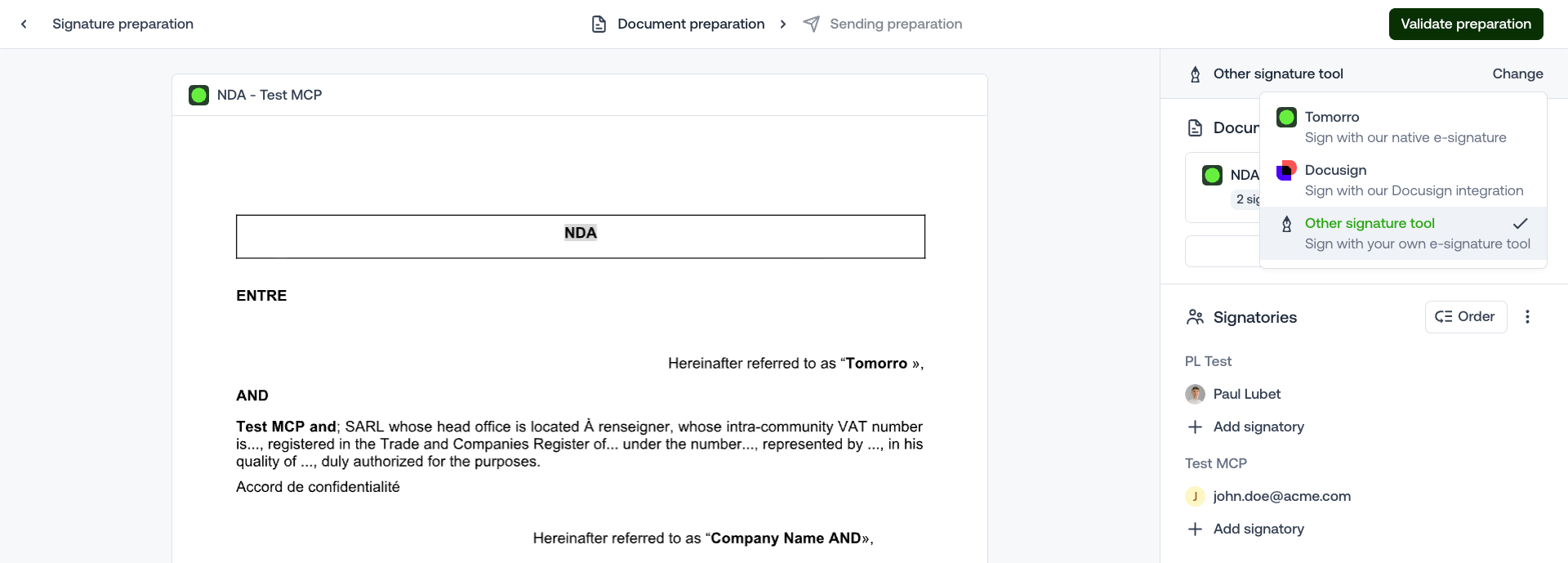
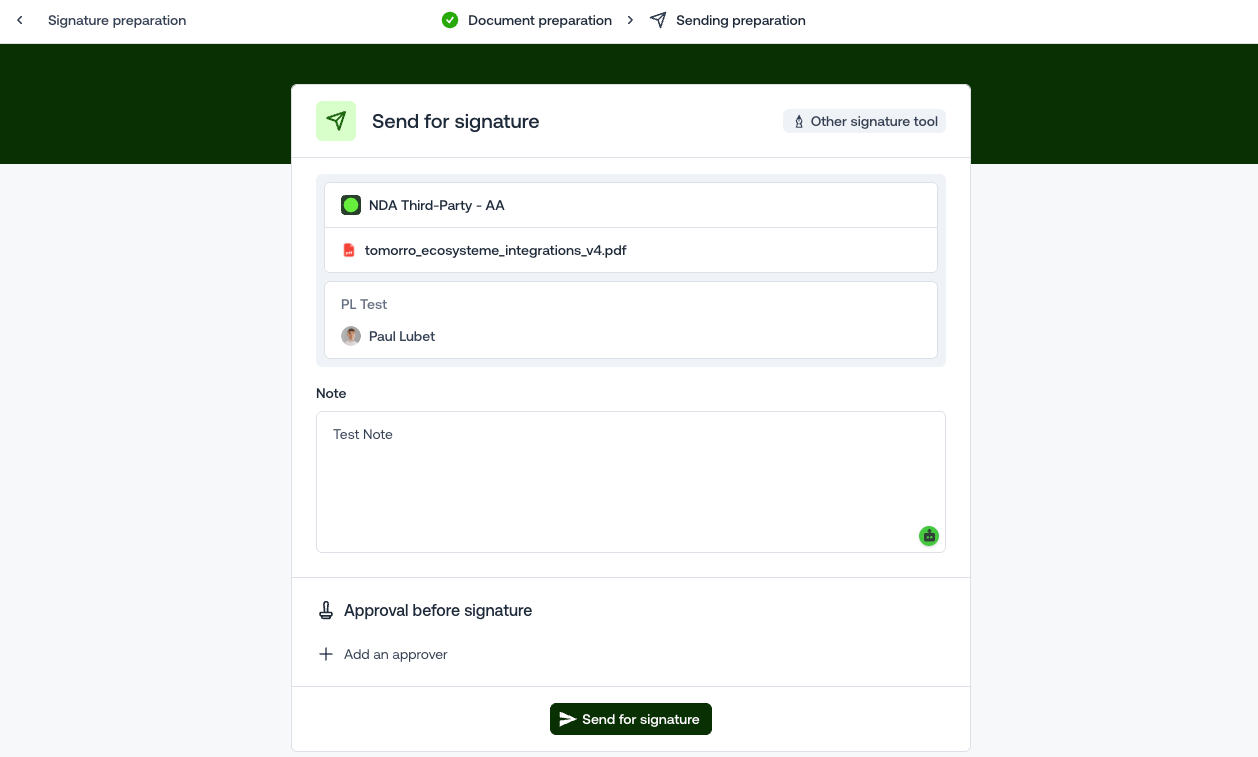
Triggered when a user clicks "Send for signature" on a Tomorro contract set to the "Other signature tool" option (after the approval workflow if there is one).
 Keep at least `data.contractId`, it is the key for every following call.
Projected payload:
```json theme={null}
{
"eventId": "9aa01b69-...",
"webhookId": "eeaa7b6d-...",
"createdAt": "2026-09-04T14:32:10.000Z",
"eventType": "signature.requested",
"data": {
"organizationId": "...",
"contractId": "...",
"signatureId": "...",
"contractName": "NDA - Acme",
"counterparty": { "id": "...", "name": "Acme" },
"signatories": [
{ "id": "...", "name": "Jane Doe", "email": "jane.doe@acme.com", "order": 0, "type": "member", "title": "CEO" },
{ "id": "...", "name": "John Doe", "email": "john.doe@external.com", "order": null, "type": "guest", "title": null }
],
"contractMembers": [ { "id": "...", "email": "..." } ],
"signatureNote": "...",
"cancelReason": "..." // only for signature.canceled
}
}
```
* `signatureNote`: the message typed by the sender, to reuse as the envelope message.
* `contractMembers`: the Tomorro members of the contract, for instance to copy them on the envelope if your tool supports it.
* `signatureId`: the Tomorro signature this event is about. A cancel then re-send on the same contract opens a new one, and the `signature.canceled` of a ceremony carries the same `signatureId` as its `signature.requested`, so you can tie them together beyond `contractId`.
```http theme={null}
GET https://api.tomorro.com/v2/contracts/{contractId}/signing-files
x-api-key:
```
Response:
```json theme={null}
{
"data": {
"contractId": "0fb3e924-...",
"firstSigningParty": "member",
"files": [
{
"id": "1ad5b1e9-...",
"isMain": true,
"order": 1,
"filename": "NDA - Acme.pdf",
"contentType": "application/pdf",
"downloadUrl": "https://s3...",
"expiresAt": "2026-09-07T10:15:00.000Z",
"pages": [{ "width": 595.303937007874, "height": 841.889763779528 }],
"fields": [
{
"id": "b9eaf0d0-...",
"signatoryId": "0e8f0597-...",
"type": "signature",
"pageIndex": 0,
"positionX": 40.5,
"positionY": 26.9598
},
{
"id": "16f6ac2a-...",
"signatoryId": "0e8f0597-...",
"type": "initials",
"pageIndex": 0,
"positionX": 69.2466,
"positionY": 87.8171
}
]
}
],
"signatories": [
{
"id": "0e8f0597-...",
"name": "Alex Smith",
"email": "alex.smith@acme.com",
"type": "member",
"title": null,
"order": 0
},
{
"id": "c94d5d06-...",
"name": "Jane Doe",
"email": "jane.doe@acme.com",
"type": "member",
"title": "CEO",
"order": 1
},
{
"id": "2f768c84-...",
"name": "",
"email": "john.doe@external.com",
"type": "guest",
"title": null,
"order": null
}
]
}
}
```
* `downloadUrl` is a pre-signed URL valid **5 minutes**, see `expiresAt`. Download the file straight away and do not store the URL. Re-call the endpoint to get a fresh one.
* `isMain` distinguishes the main document from its annexes, `files[].order` gives the order of the bundle.
* **Signing order**: `firstSigningParty` says which side signs first (`null` when the signature is not ordered). Only internal signatories (`member`) are ranked among themselves, with `signatories[].order`. Guests are never ranked: their `order` is always `null`. In the example above: Alex, then Jane, then the guest. See 3.3.
* `fields` gives the position of the signature zones placed in Tomorro. Use them, or let the third-party tool place its own. Coordinates are explained in 3.3.
* Returns `409` when there is no signature in progress on the contract: never sent for signature, canceled, or already signed. In the last case the executed PDFs are on `GET /v2/contracts/{id}/signed-files`.
*View enum details in 3.3*
```http theme={null}
GET https://api.tomorro.com/v2/contracts/{contractId}
```
Only needed if the third-party tool requires data that is not in the `signature.requested` payload or in `signing-files` (contract type, smart fields, dates, counterparty details).
Out of scope. Create the envelope, send it, wait for the signature.
While the signature is running in the third-party tool, **Tomorro sends nothing to the signatories**: no request email, no reminder, no magic link. The contract simply sits in `Signing`.
**Keep the link to the contract.** Store `contractId` on the envelope (external id, metadata or custom field, depending on your tool), or keep your own `contractId` ↔ envelope table. Flows 2 and 4 need it to know which contract to call back, and Flow 3 needs it to find the envelope to kill.
### Flow 2 - \[Third-Party → Tomorro] Signature is completed
Out of scope.
Steps 1 to 3 push the signed PDFs back to Tomorro. Each PDF (main document and each annex) goes through steps 1 and 2. Step 3 then runs **once**, with every file.
```http theme={null}
POST https://api.tomorro.com/v2/files/upload-url
x-api-key:
Content-Type: application/json
{ "contentType": "application/pdf" }
```
Response `201`:
```json theme={null}
{
"data": {
"url": "https://s3.eu-west-3.amazonaws.com/...",
"key": "signedFiles/392ef54d-.../files/59fb54e9-..."
}
}
```
* Read the values under `data`: `data.url` and `data.key`.
* `data.url` is valid **5 minutes**. Do step 2 straight away.
* Keep `data.key` for step 3. Once the file is uploaded, the key stays usable until a successful step 3 consumes it.
This call goes to the storage URL, **not** to the Tomorro API.
```http theme={null}
PUT
Content-Type: application/pdf
```
* **The body is the raw file bytes**: not `multipart/form-data`, not base64, not JSON.
* n8n: HTTP Request node, body content type **n8n Binary File**.
* Make: HTTP module, send the file data as the raw request body.
* Code: `curl -X PUT --data-binary @signed.pdf -H "Content-Type: application/pdf" ""`
* **No `x-api-key` and no `Authorization` header.** The URL carries its own signature. An extra auth header gets the upload refused.
* `Content-Type` must be `application/pdf`, the same value as in step 1.
* **Send the real PDF.** Storage accepts any bytes here, but Tomorro reads the uploaded file in step 3 and refuses anything that is not a PDF (`400 SignedFileNotPdf`), whatever `Content-Type` was declared.
* Use `data.url` exactly as returned, query string included. Do not decode or re-encode it.
* Expected response: `200`, empty body.
```http theme={null}
POST https://api.tomorro.com/v2/contracts/{contractId}/signed-version
x-api-key:
Content-Type: application/json
{
"files": [
{
"key": "signedFiles/392ef54d-.../files/59fb54e9-...",
"name": "NDA - Acme (signed).pdf",
"contentType": "application/pdf"
},
{
"key": "signedFiles/392ef54d-.../files/ba093c1c-...",
"name": "Annex 1 (signed).pdf",
"contentType": "application/pdf"
}
],
"signatureDate": "2026-09-07T10:15:00.000Z"
}
```
Response: `204 No Content`, **empty body**. Do not try to parse JSON on success.
| Field | Rule |
| - | - |
| `files` | 1 to 20 PDFs, **main document first**, then its annexes. The order is kept. |
| `files[].key` | `data.key` from step 1, once step 2 has succeeded. |
| `files[].name` | File name shown in Tomorro. Must end with `.pdf`. |
| `files[].contentType` | Always `application/pdf`. Any other type is refused. |
| `signatureDate` | When the **last signatory signed** in your tool, not when you make the call. ISO 8601 with a time zone: `2026-09-07T10:15:00.000Z` or `2026-09-07T12:15:00+02:00`.
Keep at least `data.contractId`, it is the key for every following call.
Projected payload:
```json theme={null}
{
"eventId": "9aa01b69-...",
"webhookId": "eeaa7b6d-...",
"createdAt": "2026-09-04T14:32:10.000Z",
"eventType": "signature.requested",
"data": {
"organizationId": "...",
"contractId": "...",
"signatureId": "...",
"contractName": "NDA - Acme",
"counterparty": { "id": "...", "name": "Acme" },
"signatories": [
{ "id": "...", "name": "Jane Doe", "email": "jane.doe@acme.com", "order": 0, "type": "member", "title": "CEO" },
{ "id": "...", "name": "John Doe", "email": "john.doe@external.com", "order": null, "type": "guest", "title": null }
],
"contractMembers": [ { "id": "...", "email": "..." } ],
"signatureNote": "...",
"cancelReason": "..." // only for signature.canceled
}
}
```
* `signatureNote`: the message typed by the sender, to reuse as the envelope message.
* `contractMembers`: the Tomorro members of the contract, for instance to copy them on the envelope if your tool supports it.
* `signatureId`: the Tomorro signature this event is about. A cancel then re-send on the same contract opens a new one, and the `signature.canceled` of a ceremony carries the same `signatureId` as its `signature.requested`, so you can tie them together beyond `contractId`.
```http theme={null}
GET https://api.tomorro.com/v2/contracts/{contractId}/signing-files
x-api-key:
```
Response:
```json theme={null}
{
"data": {
"contractId": "0fb3e924-...",
"firstSigningParty": "member",
"files": [
{
"id": "1ad5b1e9-...",
"isMain": true,
"order": 1,
"filename": "NDA - Acme.pdf",
"contentType": "application/pdf",
"downloadUrl": "https://s3...",
"expiresAt": "2026-09-07T10:15:00.000Z",
"pages": [{ "width": 595.303937007874, "height": 841.889763779528 }],
"fields": [
{
"id": "b9eaf0d0-...",
"signatoryId": "0e8f0597-...",
"type": "signature",
"pageIndex": 0,
"positionX": 40.5,
"positionY": 26.9598
},
{
"id": "16f6ac2a-...",
"signatoryId": "0e8f0597-...",
"type": "initials",
"pageIndex": 0,
"positionX": 69.2466,
"positionY": 87.8171
}
]
}
],
"signatories": [
{
"id": "0e8f0597-...",
"name": "Alex Smith",
"email": "alex.smith@acme.com",
"type": "member",
"title": null,
"order": 0
},
{
"id": "c94d5d06-...",
"name": "Jane Doe",
"email": "jane.doe@acme.com",
"type": "member",
"title": "CEO",
"order": 1
},
{
"id": "2f768c84-...",
"name": "",
"email": "john.doe@external.com",
"type": "guest",
"title": null,
"order": null
}
]
}
}
```
* `downloadUrl` is a pre-signed URL valid **5 minutes**, see `expiresAt`. Download the file straight away and do not store the URL. Re-call the endpoint to get a fresh one.
* `isMain` distinguishes the main document from its annexes, `files[].order` gives the order of the bundle.
* **Signing order**: `firstSigningParty` says which side signs first (`null` when the signature is not ordered). Only internal signatories (`member`) are ranked among themselves, with `signatories[].order`. Guests are never ranked: their `order` is always `null`. In the example above: Alex, then Jane, then the guest. See 3.3.
* `fields` gives the position of the signature zones placed in Tomorro. Use them, or let the third-party tool place its own. Coordinates are explained in 3.3.
* Returns `409` when there is no signature in progress on the contract: never sent for signature, canceled, or already signed. In the last case the executed PDFs are on `GET /v2/contracts/{id}/signed-files`.
*View enum details in 3.3*
```http theme={null}
GET https://api.tomorro.com/v2/contracts/{contractId}
```
Only needed if the third-party tool requires data that is not in the `signature.requested` payload or in `signing-files` (contract type, smart fields, dates, counterparty details).
Out of scope. Create the envelope, send it, wait for the signature.
While the signature is running in the third-party tool, **Tomorro sends nothing to the signatories**: no request email, no reminder, no magic link. The contract simply sits in `Signing`.
**Keep the link to the contract.** Store `contractId` on the envelope (external id, metadata or custom field, depending on your tool), or keep your own `contractId` ↔ envelope table. Flows 2 and 4 need it to know which contract to call back, and Flow 3 needs it to find the envelope to kill.
### Flow 2 - \[Third-Party → Tomorro] Signature is completed
Out of scope.
Steps 1 to 3 push the signed PDFs back to Tomorro. Each PDF (main document and each annex) goes through steps 1 and 2. Step 3 then runs **once**, with every file.
```http theme={null}
POST https://api.tomorro.com/v2/files/upload-url
x-api-key:
Content-Type: application/json
{ "contentType": "application/pdf" }
```
Response `201`:
```json theme={null}
{
"data": {
"url": "https://s3.eu-west-3.amazonaws.com/...",
"key": "signedFiles/392ef54d-.../files/59fb54e9-..."
}
}
```
* Read the values under `data`: `data.url` and `data.key`.
* `data.url` is valid **5 minutes**. Do step 2 straight away.
* Keep `data.key` for step 3. Once the file is uploaded, the key stays usable until a successful step 3 consumes it.
This call goes to the storage URL, **not** to the Tomorro API.
```http theme={null}
PUT
Content-Type: application/pdf
```
* **The body is the raw file bytes**: not `multipart/form-data`, not base64, not JSON.
* n8n: HTTP Request node, body content type **n8n Binary File**.
* Make: HTTP module, send the file data as the raw request body.
* Code: `curl -X PUT --data-binary @signed.pdf -H "Content-Type: application/pdf" ""`
* **No `x-api-key` and no `Authorization` header.** The URL carries its own signature. An extra auth header gets the upload refused.
* `Content-Type` must be `application/pdf`, the same value as in step 1.
* **Send the real PDF.** Storage accepts any bytes here, but Tomorro reads the uploaded file in step 3 and refuses anything that is not a PDF (`400 SignedFileNotPdf`), whatever `Content-Type` was declared.
* Use `data.url` exactly as returned, query string included. Do not decode or re-encode it.
* Expected response: `200`, empty body.
```http theme={null}
POST https://api.tomorro.com/v2/contracts/{contractId}/signed-version
x-api-key:
Content-Type: application/json
{
"files": [
{
"key": "signedFiles/392ef54d-.../files/59fb54e9-...",
"name": "NDA - Acme (signed).pdf",
"contentType": "application/pdf"
},
{
"key": "signedFiles/392ef54d-.../files/ba093c1c-...",
"name": "Annex 1 (signed).pdf",
"contentType": "application/pdf"
}
],
"signatureDate": "2026-09-07T10:15:00.000Z"
}
```
Response: `204 No Content`, **empty body**. Do not try to parse JSON on success.
| Field | Rule |
| - | - |
| `files` | 1 to 20 PDFs, **main document first**, then its annexes. The order is kept. |
| `files[].key` | `data.key` from step 1, once step 2 has succeeded. |
| `files[].name` | File name shown in Tomorro. Must end with `.pdf`. |
| `files[].contentType` | Always `application/pdf`. Any other type is refused. |
| `signatureDate` | When the **last signatory signed** in your tool, not when you make the call. ISO 8601 with a time zone: `2026-09-07T10:15:00.000Z` or `2026-09-07T12:15:00+02:00`.
Cannot be in the future. |
The body is strict: any other field is refused with a `400`. That includes `contractId`, which already goes in the URL.
What Tomorro does on receipt:
* attaches the PDFs as the contract's signed files, and marks the document that was sent for signature as signed
* marks every signatory as signed on `signatureDate`
* moves the contract to `signed` and stamps its signature date. If the contract type sets start date = signature date, the start date takes the same value
* runs the usual post-signature automations: notification to the contract members, `contract.signed` webhook, syncs…
**Errors on step 3**
| Code | `errorId` | Meaning | What to do |
| - | - | - | - |
| `400` | none, see `details` | Invalid body: not a PDF, name without `.pdf`, `signatureDate` missing, invalid or in the future, 0 or more than 20 files, unknown field. | Fix the payload. Do not retry as is. |
| `400` | `FileIncorrectFileKey` | A `key` is unknown, belongs to another workspace, was already consumed, or no file was uploaded under it (step 2 skipped or sent to another URL). | Redo steps 1 and 2 for that file, then step 3. |
| `400` | `SignedFileNotPdf` | A file uploaded in step 2 is not a real PDF, even though it was declared as `application/pdf` (e.g. a Word document). | Upload the actual signed PDF (steps 1 and 2), then step 3. |
| `409` | `ContractAlreadySigned` | The contract is already signed, typically by your own previous call. | Treat as success. |
| `409` | `ContractCanceled` | The contract was canceled in Tomorro. | Stop, there is nothing to sign. |
| `409` | `SignatureStartedInAnotherProvider` | A signature is in progress on the contract with Tomorro or DocuSign, not with your tool. | Stop. A Tomorro user must cancel that signature first. |
On a `409`, `error.message` only says `Conflict`: **branch on `error.errorId`**.
A refused call (`400` or `409`) changes nothing on the contract, and the keys stay usable.
**Retries**
If step 3 times out or answers `5xx`, you cannot tell whether it went through. Call `GET /v2/contracts/{contractId}`:
* `data.status` is `signed`: done.
* otherwise: send step 3 again with the same body. The keys are still valid, since only a `204` consumes them.
A `409 ContractAlreadySigned` on a retry means the first call worked.
**Also usable outside this flow**
The same endpoint accepts a contract in `draft` or `negotiating` that was never sent for signature, for instance to import a contract signed elsewhere. The first PDF then becomes a new version of the document, marked signed. Everything else is identical.
### Flow 3 - \[Tomorro → Third-Party] Signature canceled in Tomorro
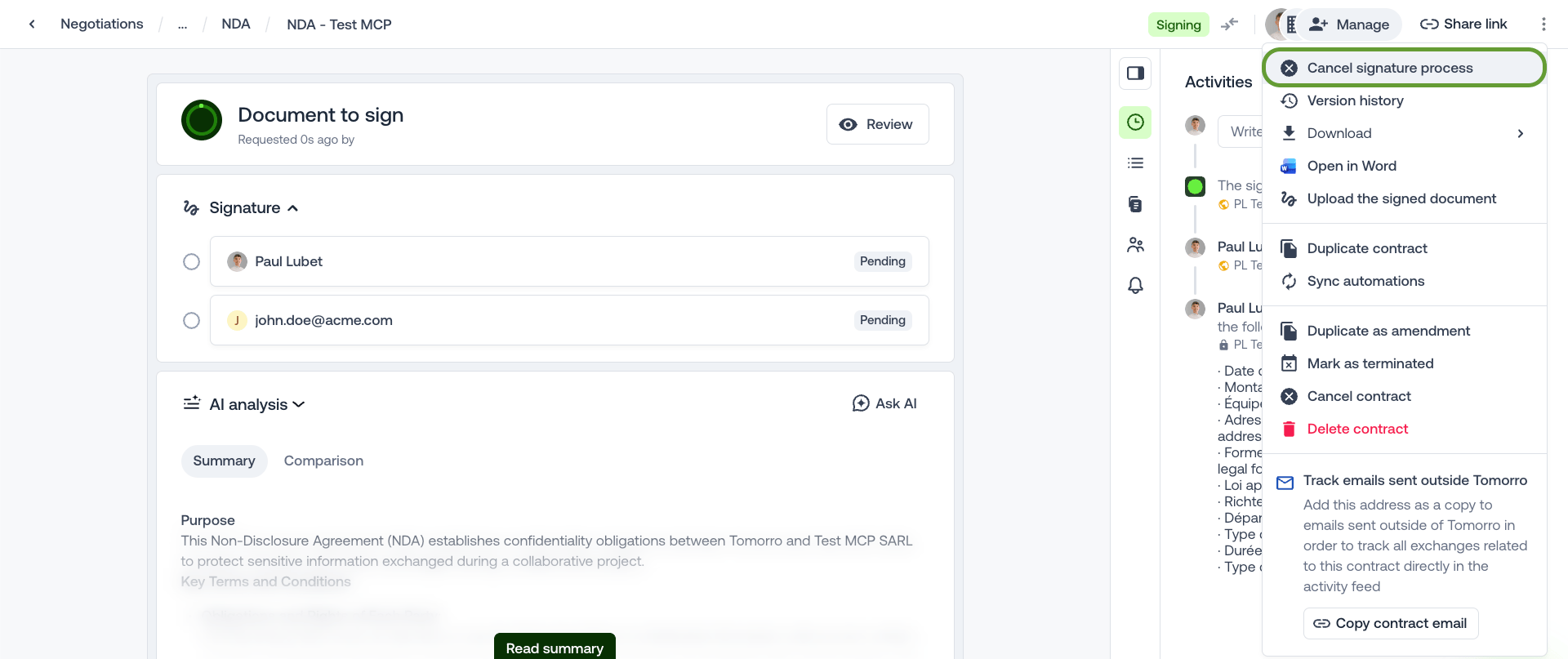 Same envelope and same verification as 3.2.1 and 3.2.2, with `eventType` = `signature.canceled`.
`data` carries one field the `signature.requested` payload does not: `cancelReason`, the reason typed by whoever canceled in Tomorro. It is a string, or `null` when no reason was given. Carry it into the cancellation on your side rather than voiding the envelope with no explanation.
```json theme={null}
{
"eventId": "757b6308-...",
"webhookId": "eeaa7b6d-...",
"createdAt": "2026-09-21T07:38:11.027Z",
"eventType": "signature.canceled",
"data": {
"organizationId": "...",
"contractId": "...",
"signatureId": "...",
"contractName": "NDA - Acme",
"counterparty": { "id": "...", "name": "Acme" },
"signatories": [ "... same shape as signature.requested ..." ],
"contractMembers": [ "... same shape as signature.requested ..." ],
"signatureNote": null,
"cancelReason": "Wrong counterparty entity"
}
}
```
Out of scope. Kill the envelope on the third-party side so the signatories stop receiving its reminders.
***No call back to Tomorro. The flow ends at step 2.***
*The signature is already canceled on the Tomorro side, the contract is already back to `draft` or `negotiating`. Do **not** call `cancel-signatures` here. It would be rejected with a `400`, since the contract is no longer in `signing`.*
**Expect the echo from your tool.** Killing the envelope usually makes your tool fire its own "canceled" event, which starts your Flow 4. There, `cancel-signatures` answers `400` because the contract is no longer in `signing`: this is expected, treat it as success. To skip the extra call, ignore that event in Flow 4 when the cancel came from Tomorro.
### Flow 4 - \[Third-Party → Tomorro] Signature canceled in the third-party tool
The signature will not complete: refused, canceled or expired in the third-party tool.
Out of scope.
```http theme={null}
POST https://api.tomorro.com/v2/contracts/{contractId}/cancel-signatures
x-api-key:
{ "cancelReason": "Refused by the signatory in Yousign" }
```
`cancelReason` is optional.
Tomorro runs the same flow as the cancel button in the app: the contract leaves `Signing`, goes back to `draft` or `negotiating`, and the contract participants are notified.
Response: `204 No Content`, **empty body**. Rejected with a `400` if the contract is not in `signing` (never sent for signature, already signed or canceled).
**Retry**: if the call times out or answers `5xx`, send it again. A `400` on that retry means the first call went through: treat it as success.
This cancellation also fires `signature.canceled` to your endpoint, exactly like a cancel made in Tomorro (Flow 3). The envelope is already dead on your side: verify the signature, answer 2xx, and do nothing else.
### Flow 5 - \[Third-Party → Tomorro] Add attachments (optional)
Adds a file to the contract's attachments, next to its signed document. Typically the **signature certificate** when your tool does not put it in the signed bundle, or any supporting document it produces (audit trail, evidence file...).
* **When**: usually right after Flow 2 has answered `204`. The endpoint works on a contract in any status and **never changes the status**.
* **One file per call.** Unlike `signed-version`, which takes every PDF in one call, each attachment runs through steps 1, 2 and 3 on its own.
* **Not only PDFs**: PDF, Word, Excel and more. See *Accepted file types* in 3.3.
Steps 1 and 2 are the same upload as in Flow 2, for any accepted file type. Each attachment goes through steps 1 to 3 on its own. The **same `contentType`** is sent in all three steps, and the file `name` must end with the **matching extension** (`.pdf` for `application/pdf`, `.xlsx` for Excel...).
```http theme={null}
POST https://api.tomorro.com/v2/files/upload-url
x-api-key:
Content-Type: application/json
{ "contentType": "application/pdf" }
```
Replace `application/pdf` with the content type of your file (see *Accepted file types*).
Response `201`:
```json theme={null}
{
"data": {
"url": "https://s3.eu-west-3.amazonaws.com/...",
"key": "signedFiles/392ef54d-.../files/ba093c1c-..."
}
}
```
* Read the values under `data`: `data.url` and `data.key`.
* n8n: in the following nodes, reference them by the node name, e.g. `{{ $('Get upload URL').item.json.data.key }}`.
* Make: enable **Parse response** on the HTTP module so `data.url` and `data.key` can be mapped in the next modules.
* `data.url` is valid **5 minutes**. Do step 2 straight away.
* Keep `data.key` for step 3. Once the file is uploaded, the key stays usable until a successful step 3 consumes it. Pass it **unchanged** (no trimming, no leading `/`, not the URL): one key = one file = one attachment.
* A content type that is not accepted is already refused here with `400 FileContentTypeNotAllowed`.
This call goes to the storage URL, **not** to the Tomorro API.
```http theme={null}
PUT
Content-Type: application/pdf
```
* **The body is the raw file bytes**: not `multipart/form-data`, not base64, not JSON.
* n8n: HTTP Request node, method `PUT`, URL `data.url`, body content type **n8n Binary File**, pointing at the binary property that holds the file.
* Make: HTTP module, method `PUT`, send the file data as the raw request body.
* Code: `curl -X PUT --data-binary @certificate.pdf -H "Content-Type: application/pdf" ""`, or in Node.js `await fetch(url, { method: 'PUT', headers: { 'Content-Type': contentType }, body: fileBuffer })`.
* **No `x-api-key` and no `Authorization` header.** The URL carries its own signature. An extra auth header gets the upload refused. In n8n and Make, make sure this node does not reuse the Tomorro credential (authentication: none).
* `Content-Type` must be the same value as in step 1.
* Use `data.url` exactly as returned, query string included. Do not decode or re-encode it.
* Expected response: `200`, empty body.
```http theme={null}
POST https://api.tomorro.com/v2/contracts/{contractId}/attachments
x-api-key:
Content-Type: application/json
{
"key": "signedFiles/392ef54d-.../files/ba093c1c-...",
"name": "Signature certificate.pdf",
"contentType": "application/pdf",
"isSharedWithGuest": true
}
```
Response: `204 No Content`, **empty body**. Do not try to parse JSON on success.
| Field | Rule |
| - | - |
| `key` | **Required.** `data.key` from step 1, once step 2 has succeeded. |
| `name` | **Required.** File name shown in Tomorro. Must end with the extension matching `contentType`. |
| `contentType` | **Required.** The same value as in steps 1 and 2. See *Accepted file types*. |
| `isSharedWithGuest` | Optional boolean, **default `false`**.
Same envelope and same verification as 3.2.1 and 3.2.2, with `eventType` = `signature.canceled`.
`data` carries one field the `signature.requested` payload does not: `cancelReason`, the reason typed by whoever canceled in Tomorro. It is a string, or `null` when no reason was given. Carry it into the cancellation on your side rather than voiding the envelope with no explanation.
```json theme={null}
{
"eventId": "757b6308-...",
"webhookId": "eeaa7b6d-...",
"createdAt": "2026-09-21T07:38:11.027Z",
"eventType": "signature.canceled",
"data": {
"organizationId": "...",
"contractId": "...",
"signatureId": "...",
"contractName": "NDA - Acme",
"counterparty": { "id": "...", "name": "Acme" },
"signatories": [ "... same shape as signature.requested ..." ],
"contractMembers": [ "... same shape as signature.requested ..." ],
"signatureNote": null,
"cancelReason": "Wrong counterparty entity"
}
}
```
Out of scope. Kill the envelope on the third-party side so the signatories stop receiving its reminders.
***No call back to Tomorro. The flow ends at step 2.***
*The signature is already canceled on the Tomorro side, the contract is already back to `draft` or `negotiating`. Do **not** call `cancel-signatures` here. It would be rejected with a `400`, since the contract is no longer in `signing`.*
**Expect the echo from your tool.** Killing the envelope usually makes your tool fire its own "canceled" event, which starts your Flow 4. There, `cancel-signatures` answers `400` because the contract is no longer in `signing`: this is expected, treat it as success. To skip the extra call, ignore that event in Flow 4 when the cancel came from Tomorro.
### Flow 4 - \[Third-Party → Tomorro] Signature canceled in the third-party tool
The signature will not complete: refused, canceled or expired in the third-party tool.
Out of scope.
```http theme={null}
POST https://api.tomorro.com/v2/contracts/{contractId}/cancel-signatures
x-api-key:
{ "cancelReason": "Refused by the signatory in Yousign" }
```
`cancelReason` is optional.
Tomorro runs the same flow as the cancel button in the app: the contract leaves `Signing`, goes back to `draft` or `negotiating`, and the contract participants are notified.
Response: `204 No Content`, **empty body**. Rejected with a `400` if the contract is not in `signing` (never sent for signature, already signed or canceled).
**Retry**: if the call times out or answers `5xx`, send it again. A `400` on that retry means the first call went through: treat it as success.
This cancellation also fires `signature.canceled` to your endpoint, exactly like a cancel made in Tomorro (Flow 3). The envelope is already dead on your side: verify the signature, answer 2xx, and do nothing else.
### Flow 5 - \[Third-Party → Tomorro] Add attachments (optional)
Adds a file to the contract's attachments, next to its signed document. Typically the **signature certificate** when your tool does not put it in the signed bundle, or any supporting document it produces (audit trail, evidence file...).
* **When**: usually right after Flow 2 has answered `204`. The endpoint works on a contract in any status and **never changes the status**.
* **One file per call.** Unlike `signed-version`, which takes every PDF in one call, each attachment runs through steps 1, 2 and 3 on its own.
* **Not only PDFs**: PDF, Word, Excel and more. See *Accepted file types* in 3.3.
Steps 1 and 2 are the same upload as in Flow 2, for any accepted file type. Each attachment goes through steps 1 to 3 on its own. The **same `contentType`** is sent in all three steps, and the file `name` must end with the **matching extension** (`.pdf` for `application/pdf`, `.xlsx` for Excel...).
```http theme={null}
POST https://api.tomorro.com/v2/files/upload-url
x-api-key:
Content-Type: application/json
{ "contentType": "application/pdf" }
```
Replace `application/pdf` with the content type of your file (see *Accepted file types*).
Response `201`:
```json theme={null}
{
"data": {
"url": "https://s3.eu-west-3.amazonaws.com/...",
"key": "signedFiles/392ef54d-.../files/ba093c1c-..."
}
}
```
* Read the values under `data`: `data.url` and `data.key`.
* n8n: in the following nodes, reference them by the node name, e.g. `{{ $('Get upload URL').item.json.data.key }}`.
* Make: enable **Parse response** on the HTTP module so `data.url` and `data.key` can be mapped in the next modules.
* `data.url` is valid **5 minutes**. Do step 2 straight away.
* Keep `data.key` for step 3. Once the file is uploaded, the key stays usable until a successful step 3 consumes it. Pass it **unchanged** (no trimming, no leading `/`, not the URL): one key = one file = one attachment.
* A content type that is not accepted is already refused here with `400 FileContentTypeNotAllowed`.
This call goes to the storage URL, **not** to the Tomorro API.
```http theme={null}
PUT
Content-Type: application/pdf
```
* **The body is the raw file bytes**: not `multipart/form-data`, not base64, not JSON.
* n8n: HTTP Request node, method `PUT`, URL `data.url`, body content type **n8n Binary File**, pointing at the binary property that holds the file.
* Make: HTTP module, method `PUT`, send the file data as the raw request body.
* Code: `curl -X PUT --data-binary @certificate.pdf -H "Content-Type: application/pdf" ""`, or in Node.js `await fetch(url, { method: 'PUT', headers: { 'Content-Type': contentType }, body: fileBuffer })`.
* **No `x-api-key` and no `Authorization` header.** The URL carries its own signature. An extra auth header gets the upload refused. In n8n and Make, make sure this node does not reuse the Tomorro credential (authentication: none).
* `Content-Type` must be the same value as in step 1.
* Use `data.url` exactly as returned, query string included. Do not decode or re-encode it.
* Expected response: `200`, empty body.
```http theme={null}
POST https://api.tomorro.com/v2/contracts/{contractId}/attachments
x-api-key:
Content-Type: application/json
{
"key": "signedFiles/392ef54d-.../files/ba093c1c-...",
"name": "Signature certificate.pdf",
"contentType": "application/pdf",
"isSharedWithGuest": true
}
```
Response: `204 No Content`, **empty body**. Do not try to parse JSON on success.
| Field | Rule |
| - | - |
| `key` | **Required.** `data.key` from step 1, once step 2 has succeeded. |
| `name` | **Required.** File name shown in Tomorro. Must end with the extension matching `contentType`. |
| `contentType` | **Required.** The same value as in steps 1 and 2. See *Accepted file types*. |
| `isSharedWithGuest` | Optional boolean, **default `false`**.
`true` = **external**: the file is also shared with the contract guests, so the counterparty sees it.
`false` = **internal**: only the members of your organization see it. |
The body is strict and **flat**: the four fields sit at the root, with no `file` wrapper. Any other field is refused with a `400`, including `contractId`, which already goes in the URL.
See *Accepted file types* below in 3.3.
**Errors on step 3**
| Code | `errorId` | Meaning | What to do |
| - | - | - | - |
| `400` | none, see `details` | Invalid body: a required field is missing or empty, an unknown field is sent (`file`, `contractId`...), `isSharedWithGuest` is not a boolean. | Fix the payload. Do not retry as is. |
| `400` | `FileContentTypeNotAllowed` | `contentType` is not in the accepted list. | Use a supported format (3.3). |
| `400` | `FileExtensionMismatchContentType` | The extension of `name` does not match `contentType`, e.g. `report.xlsx` sent as `application/pdf`. | Fix `name` or `contentType`. |
| `400` | `FileIncorrectFileKey` | `key` is not the value returned by step 1: altered, empty, or obtained with an API key of another workspace. | Pass `data.key` exactly as returned. If in doubt, redo steps 1 and 2. |
| `403` | none | The contract does not exist or is not visible to the automation account, the account is not allowed to add files, or attachments are not included in your plan. Indistinguishable, on purpose. | Do not retry. Check 1.1. |
A refused call changes nothing on the contract.
**Retries**
A key is consumed by a successful step 3. If step 3 times out or answers `5xx`, retry **once** with the same body: if the first call actually went through, the retry is refused and the file is already on the contract. Do not start over from step 1 in that case, or the file ends up attached twice.
**Also usable outside this flow**
The endpoint is not tied to the signature: any integration can use it to add a supporting document to any contract, in any status.
## 3. Technical references
Reference material: conventions, webhook mechanics, enums and errors. Read it once, then come back to it while implementing the flows above.
### 3.1 - API conventions
* **REST only.** The whole integration runs on the public REST API.
* **Base URL**: `https://api.tomorro.com/v2`
* **Authentication**: `x-api-key: ` on every call. A missing or unknown key returns 401.
* **Versioning**: optional `tomorro-version` header, defaults to the latest version.
* **Rate limit**: 40 calls per minute, well above what this integration needs.
* **Sandbox**: available on request. It is an empty sandbox, not a copy of your production workspace.
* **Content type**: `application/json`
* **Response envelope**: every **successful** JSON response is wrapped in a `data` object (errors come as `{ error, meta }`, see 3.4). Read `data.url`, `data.files` and so on. A `204` response has no body at all.
### 3.2 - Receiving webhooks
Full documentation: [Technical documentation - Tomorro API](/webhooks/technical-documentation)
#### 3.2.1 - Payload
Tomorro sends a `POST` to the configured URL. Both events use the same envelope and the same `data` shape, the business payload sits under `data`.
These webhooks are organization-based, meaning every contract sent for signature through the third-party option will fire.
A delivery triggered by the **test buttons** in the admin console carries one extra top-level field, `"test": true`, absent from every genuine event. See 3.2.4.
```json theme={null}
{
"eventId": "9aa01b69-...",
"webhookId": "eeaa7b6d-...",
"createdAt": "2026-09-04T14:32:10.000Z",
"eventType": "signature.requested",
"data": {
"organizationId": "...",
"contractId": "...",
"signatureId": "...",
"contractName": "NDA - Acme",
"counterparty": { "id": "...", "name": "Acme" },
"signatories": [
{ "id": "...", "name": "Jane Doe", "email": "jane.doe@acme.com", "order": 0, "type": "member", "title": "CEO" },
{ "id": "...", "name": "John Doe", "email": "john.doe@external.com", "order": null, "type": "guest", "title": null }
],
"contractMembers": [ { "id": "...", "email": "..." } ],
"signatureNote": "...",
"cancelReason": "..." // only for signature.canceled
}
}
```
#### 3.2.2 - Signature verification
Header `Leeway-Signature` (also sent as `Leeway_Signature`):
```text theme={null}
Leeway-Signature: t=1788860270398,sha256=3f1c9d02a7...
```
Verification steps:
1. Split the header on `,` to get `t` (timestamp in milliseconds) and `sha256`.
2. Recompute `HMAC-SHA256(secret, ".")` in hexadecimal. **Use the raw body**, not a re-serialized JSON object, otherwise the hash will not match.
3. Compare in constant time with the `sha256` value.
4. Reject the call if the signature does not match, and reject a `t` that is too old to protect against replay (5 minutes is a reasonable window).
#### 3.2.3 - Acknowledgement and retries
* **Timeout 3000 ms.** The endpoint must answer 2xx in under 3 seconds. Acknowledge first, do the work asynchronously.
* Any non-2xx answer or timeout triggers a retry: **10 attempts in total** (first delivery + 9 retries), 5 minutes apart, about 45 minutes. The count is per event, but reaching it disables the whole webhook.
* **After the 10th failure the webhook is automatically disabled** (`enabled = false`). It has to be re-enabled in the admin console, and the "Other signature tool" option disappears from the UI while it is disabled. A contract that was already switched to the provider keeps it listed, but cannot be sent for signature until the endpoint is active again.
* **A `signature.requested` that fails all 10 attempts is rolled back in Tomorro**: the signature is canceled by Tomorro, the contract goes back to `negotiating` and the sender receives the usual "signature canceled" email asking to send again. No `signature.canceled` reaches you, since the webhook is disabled by then. If your tool did create the envelope anyway (answer later than 3 s), you can still push the signed PDFs on `POST /v2/contracts/{id}/signed-version`, which accepts a contract in `negotiating`.
* **Events fired while the webhook is disabled are dropped**, not queued and not replayed on re-enable. A signature canceled in Tomorro during that window never reaches your endpoint: after re-enabling, reconcile the contracts you had in `signing`.
* **Idempotency**: a retry resends the same `eventId`. Deduplicate on `eventId`, an event can legitimately arrive several times.
#### 3.2.4 - Test fires from the admin console
The **Send a test** buttons in the admin console fire a **real, signed delivery** at your URL: same envelope, same `Leeway-Signature` header, same 3 s timeout. The body is synthetic: its ids name **no real contract**, so every API call made with them is rejected.
A test fire is recognizable by one extra top-level field, which never appears on a genuine event:
```json theme={null}
{
"eventId": "7f3c1a02-9d4e-4b16-8c5a-21e0f6b8d734",
"webhookId": "",
"createdAt": "2026-09-21T09:19:12.921Z",
"eventType": "signature.requested",
"test": true,
"data": {
"organizationId": "",
"contractId": "c41b7e58-2a6d-4f93-b0e7-5d8c39a17b62",
"signatureId": "5a0e9c73-1d4b-4f28-9b6e-83c2f7d41a06",
"contractName": "Test contract",
"counterparty": { "id": "9e2d4f81-6b35-47ac-a91f-0c7b52e8d413", "name": "Test counterparty" },
"signatories": [
{
"id": "2b54acdd-5f44-4245-845e-4a3a1d346724",
"name": "John Doe",
"email": "john.doe@external.com",
"order": null,
"type": "guest",
"title": "Legal Counsel"
},
{
"id": "cd9e52bf-34e1-45cc-ba00-1028b2244a3f",
"name": "Jane Doe",
"email": "jane.doe@internal.com",
"order": null,
"type": "member",
"title": "CEO"
}
],
"contractMembers": [
{ "id": "3d8a61f4-5c07-4e2b-9a34-7f1b0d6e59c8", "email": "jane.doe@internal.com" },
{ "id": "bd9e52bf-39e1-45cc-ba00-1024b2244a3f", "email": "richard.roe@internal.com" }
],
"signatureNote": "Test signature note"
}
}
```
**Branch on `test`: verify the signature, answer 2xx, and stop there.**
The `signature.canceled` test is the same body with `"eventType": "signature.canceled"` and `data.cancelReason`. Tests are not retried and do **not** count towards the 10 failures that disable the webhook (3.2.3).
### 3.3 - Enum and field reference
| Field | Values | Note |
| - | - | - |
| `eventType` | `signature.requested` , `signature.canceled` | Only these two for this integration. |
| `data.status` on `GET /v2/contracts/{id}` | `draft` , `negotiating` , `signing` , `signed` , `canceled` | `signing` while the signature runs in your tool. A canceled signature sends the contract back to `draft` or `negotiating`, not to `canceled`. |
| `signatories[].type` | `member` , `guest` | `member` = internal party, `guest` = external party. |
| `signatories[].order` | integer or `null` | Rank among the internal signatories (`member`), **starting at 0**. Always `null` on guests, who are never ranked among themselves, and on everyone when the signature is not ordered. Which side signs first is carried by `firstSigningParty`. |
| `signatories[].name` | string | **Identify a signatory by `email`, never by `name`.** `name` can be `""` when a guest was invited by email and has not named itself yet, on the webhook and on `signing-files` alike. |
| `signatories[].title` | string or `null` | The signatory's job title, `null` when not filled in. |
| `signatureNote` | string or `null` | The note typed by the sender. `null` when no note was written. |
| `signatureId` | string (UUID) | The Tomorro signature the event is about. Same value on the `signature.requested` and the `signature.canceled` of one ceremony; a new one after a cancel and re-send. |
| `cancelReason` | string or `null` | **Only on `signature.canceled`.** The reason typed by whoever canceled, `null` when none was given. |
| `firstSigningParty` | `member` , `guest` , `null` | Which side signs first.
`member` = internal party, `guest` = external party.
`null` = when the signature is not ordered. |
| `files[].fields[].type` | `signature` , `initials` | **Different axis from `signatories[].type`.** Both are named `type`, one says who, the other says what kind of mark. |
| `files[].pages[]` | `{ width, height }` | Page dimensions in points, one entry per page in page order, to convert the percentages into absolute coordinates. Floats, not integers (e.g. `595.303937007874`). |
| `files[].fields[].positionX` / `positionY` | float | Percentage (0 to 100) of the page width and height. It locates the **top-left corner of the field**, measured from the top-left corner of the page. In PDF points: `x = positionX / 100 × pages[pageIndex].width`, same for `y` with `height`.
The origin is the **top-left** corner and `y` grows downwards. If your tool measures from the **bottom-left** (native PDF coordinates), convert: `y = height − y`, minus the field height if your tool positions a field by its bottom-left corner.
No field width or height is sent: use the default field size of your tool. |
| `files[].fields[].pageIndex` | integer | **0-based**, `0` is the first page. |
**Accepted file types**
For `files/upload-url` and `attachments` (Flow 5). The `name` must end with the extension on the same row, and the same `contentType` is sent in the three steps. `signed-version` (Flow 2) only accepts PDF.
| File | `name` ends with | `contentType` |
| - | - | - |
| **PDF** | `.pdf` | `application/pdf` |
| **Word** | `.docx` | `application/vnd.openxmlformats-officedocument.wordprocessingml.document` |
| **Excel** | `.xlsx` | `application/vnd.openxmlformats-officedocument.spreadsheetml.sheet` |
| File | `name` ends with | `contentType` |
| - | - | - |
| Word (legacy) | `.doc`, `.rtf` | `application/msword` |
| Excel (legacy) | `.xls` | `application/vnd.ms-excel` |
| Excel with macros | `.xlsm` | `application/vnd.ms-excel.sheet.macroenabled.12` |
| PowerPoint | `.pptx` | `application/vnd.openxmlformats-officedocument.presentationml.presentation` |
| PowerPoint (legacy) | `.ppt` | `application/vnd.ms-powerpoint` |
| Outlook email | `.msg` | `application/vnd.ms-outlook` |
| OpenDocument text | `.odt` | `application/vnd.oasis.opendocument.text` |
| OpenDocument spreadsheet | `.ods` | `application/vnd.oasis.opendocument.spreadsheet` |
| OpenDocument presentation | `.odp` | `application/vnd.oasis.opendocument.presentation` |
| OpenDocument drawing | `.odg` | `application/vnd.oasis.opendocument.graphics` |
| CSV | `.csv` | `text/csv` |
| Text | `.txt` | `text/plain` |
| JPEG image | `.jpg`, `.jpeg` | `image/jpeg` |
| PNG image | `.png` | `image/png` |
| HEIC / HEIF image | `.heic` / `.heif` | `image/heic` / `image/heif` |
| TIFF image | `.tiff`, `.tif` | `image/tiff` |
| WebP image | `.webp` | `image/webp` |
### 3.4 - Error handling
Every endpoint follows the standard error format of the REST API, no specific contract for this integration.
**Error envelope**
```json theme={null}
{
"error": {
"statusCode": "409",
"errorId": "optional, present on some domain errors",
"message": "Human readable message",
"details": [
{ "field": "files.0.contentType", "message": "..." }
]
},
"meta": {
"timestamp": "2026-09-08T10:09:22.634Z",
"requestId": "req_Ab12Cd34"
}
}
```
* `error.statusCode` is a **string**, not a number.
* `error.details` is only present on validation errors, one entry per offending field.
* `meta.requestId` is the value to quote to Tomorro support when reporting a failing call. Log it. It is also sent in the `x-request-id` response header.
**Status codes (summary)**
Details per endpoint are in Flows 2, 4 and 5.
| Code | Meaning | Retry? |
| - | - | - |
| `400` | Invalid body (payloads are strict, unknown fields are refused), or contract not in `signing` on `cancel-signatures`. | No |
| `401` | Missing or unknown `x-api-key`. | No |
| `403` | No permission, or contract missing or not visible to the automation account. Indistinguishable, on purpose. | No |
| `404` | Only on `GET /v2/contracts/{id}` (`ContractNotFound`). | No |
| `409` | State conflict. Branch on `error.errorId` (`ContractAlreadySigned` = success). On `signing-files`, no `errorId`: read `error.message`. | No |
| `429` | Rate limit exceeded (40 calls per minute). | Yes, with backoff |
| `500` / timeout | Internal error. | Yes, with backoff. Once only on `attachments` (Flow 5). |
### 3.5 - Tomorro REST API Collection
`tomorro-openapi.json`
This documentation is built and hosted on [Mintlify](https://mintlify.com), a developer documentation platform.