> ## Documentation Index
> Fetch the complete documentation index at: https://alpha.developer.tomorro.com/llms.txt
> Use this file to discover all available pages before exploring further.
# Non-Technical scoping
> Sync your counterparties: what the business owner decides, and the brief to hand to IT
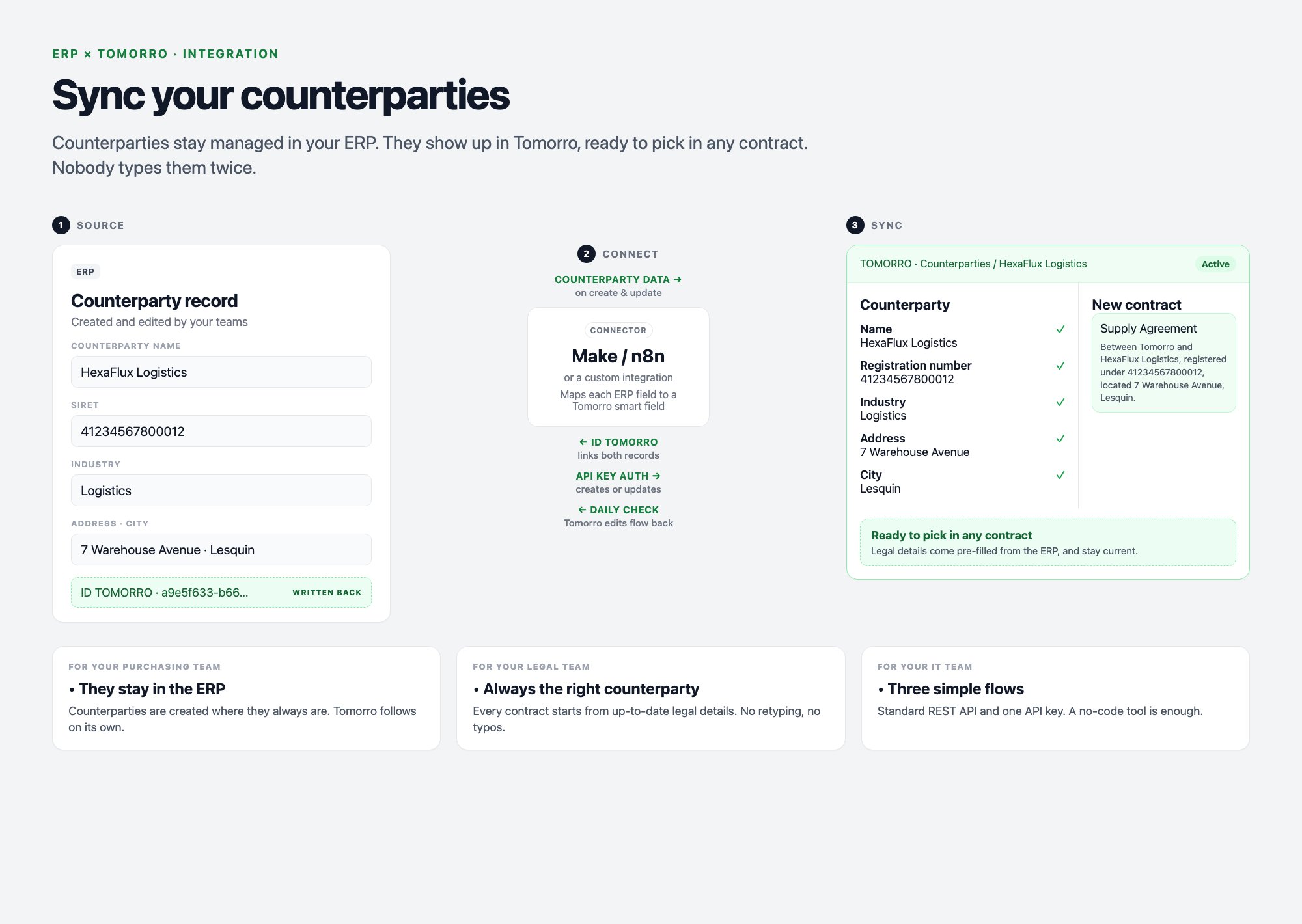
**Goal:** your ERP stays the reference for counterparties. Every counterparty created or edited there shows up in Tomorro, ready to pick in any contract. Nobody types it twice.
**TL;DR:** three small flows, run by a no-code tool (Make, n8n) or a few lines of code.
* **Flow 1: Counterparty created in the ERP.**
* **Flow 2: Counterparty updated in the ERP.**
* **Flow 3: Counterparty updated in Tomorro.**
 **For the business owner.** A few decisions, no technical skills needed. Fill in the brief below and send it to your IT team or integrator: with the [Technical recipes](/guides/sync-your-counterparties/technical-recipes), it has everything they need.
## Brief for your IT team
Copy this brief, fill in the blanks, and send it to your IT team or integrator. **It is all they need from you.**
```markdown Brief for IT theme={null}
Subject: ERP x Tomorro counterparty sync — ready to build
Hi,
I have done the business part of the ERP x Tomorro counterparty sync. Over to you:
everything you need to build it is below.
1. Scope
- Counterparties to sync: ______________________ (e.g. active counterparties of the French entity)
- Counterparties are created in: ______________________ (e.g. the ERP only)
- Tomorro users may correct counterparty data: yes / no (no = Flow 3 not needed)
- Same-day conflict, the winner is: ERP / Tomorro
2. Data mapping (ERP field -> Tomorro field)
- ______________________ -> Counterparty name (required)
- ______________________ -> ______________________
- ______________________ -> ______________________
- ______________________ -> ______________________
- New ERP column "ID tomorro" -> filled by the integration
3. Timing
- Flow 1 - Counterparty created in the ERP: ______________________ (e.g. as soon as the counterparty is created)
- Flow 2 - Counterparty updated in the ERP: ______________________ (e.g. as soon as the counterparty changes)
- Flow 3 - Counterparty updated in Tomorro: ______________________ (e.g. once a day, every morning at 8:00)
4. Done on my side
- [ ] Missing fields created in Tomorro, with the same list values as the ERP
Your part (all in the technical recipes):
- Technical recipes: https://alpha.developer.tomorro.com/guides/sync-your-counterparties/technical-recipes
- Ready-to-import Make scenarios: https://alpha.developer.tomorro.com/guides/sync-your-counterparties/full-cycle-example#make-blueprints
- API key: Tomorro > Settings > Integrations > API key, from a dedicated superadmin account
Thanks!
```
## Help to complete the brief
### 1 - Scope
| Question | Example answer | Why it matters |
| - | - | - |
| Which counterparties go to Tomorro? | Active counterparties of the French entity | Only these show up in contracts |
| Where are counterparties created? | In the ERP only | One source of truth, no duplicates |
| Can Tomorro users correct counterparty data? | Yes | If not, Flow 3 is not needed |
| Both sides changed the same day: who wins? | The ERP | No conflict to manage by hand |
### 2 - Data mapping
One line per counterparty field you want in Tomorro.
Example only: list your own ERP fields and the Tomorro fields they should fill.
| ERP field | Tomorro field | Rule |
| - | - | - |
| Supplier name | Counterparty name | Required |
| SIRET | Registration number | Copied as is |
| Industry | Industry (list) | Same list of values in both tools |
| Address | Address | Copied as is |
| City | City of registration | Copied as is |
| ID tomorro | - | New ERP column, filled automatically |
### 3 - Timing
When should each automation run, and what starts it?
Example only: choose the timing that fits your process.
| Flow | What starts it | When it runs |
| - | - | - |
| Flow 1 - Counterparty created in the ERP | Every counterparty created in the ERP | As soon as the counterparty is created in the ERP |
| Flow 2 - Counterparty updated in the ERP | Every change in the ERP | As soon as the counterparty changes in the ERP |
| Flow 3 - Counterparty updated in Tomorro | Every change in Tomorro | Once a day, every morning at 8:00 |
### 4 - Checklist
* [ ] Scope (1), mapping (2) and timing (3) validated
* [ ] Missing fields created in Tomorro (**Libraries > Dynamic components > Smart fields**), with the same Industry values as the ERP
* [ ] An IT contact or integrator to build the flows, and the brief sent to them
This documentation is built and hosted on [Mintlify](https://mintlify.com), a developer documentation platform.
**For the business owner.** A few decisions, no technical skills needed. Fill in the brief below and send it to your IT team or integrator: with the [Technical recipes](/guides/sync-your-counterparties/technical-recipes), it has everything they need.
## Brief for your IT team
Copy this brief, fill in the blanks, and send it to your IT team or integrator. **It is all they need from you.**
```markdown Brief for IT theme={null}
Subject: ERP x Tomorro counterparty sync — ready to build
Hi,
I have done the business part of the ERP x Tomorro counterparty sync. Over to you:
everything you need to build it is below.
1. Scope
- Counterparties to sync: ______________________ (e.g. active counterparties of the French entity)
- Counterparties are created in: ______________________ (e.g. the ERP only)
- Tomorro users may correct counterparty data: yes / no (no = Flow 3 not needed)
- Same-day conflict, the winner is: ERP / Tomorro
2. Data mapping (ERP field -> Tomorro field)
- ______________________ -> Counterparty name (required)
- ______________________ -> ______________________
- ______________________ -> ______________________
- ______________________ -> ______________________
- New ERP column "ID tomorro" -> filled by the integration
3. Timing
- Flow 1 - Counterparty created in the ERP: ______________________ (e.g. as soon as the counterparty is created)
- Flow 2 - Counterparty updated in the ERP: ______________________ (e.g. as soon as the counterparty changes)
- Flow 3 - Counterparty updated in Tomorro: ______________________ (e.g. once a day, every morning at 8:00)
4. Done on my side
- [ ] Missing fields created in Tomorro, with the same list values as the ERP
Your part (all in the technical recipes):
- Technical recipes: https://alpha.developer.tomorro.com/guides/sync-your-counterparties/technical-recipes
- Ready-to-import Make scenarios: https://alpha.developer.tomorro.com/guides/sync-your-counterparties/full-cycle-example#make-blueprints
- API key: Tomorro > Settings > Integrations > API key, from a dedicated superadmin account
Thanks!
```
## Help to complete the brief
### 1 - Scope
| Question | Example answer | Why it matters |
| - | - | - |
| Which counterparties go to Tomorro? | Active counterparties of the French entity | Only these show up in contracts |
| Where are counterparties created? | In the ERP only | One source of truth, no duplicates |
| Can Tomorro users correct counterparty data? | Yes | If not, Flow 3 is not needed |
| Both sides changed the same day: who wins? | The ERP | No conflict to manage by hand |
### 2 - Data mapping
One line per counterparty field you want in Tomorro.
Example only: list your own ERP fields and the Tomorro fields they should fill.
| ERP field | Tomorro field | Rule |
| - | - | - |
| Supplier name | Counterparty name | Required |
| SIRET | Registration number | Copied as is |
| Industry | Industry (list) | Same list of values in both tools |
| Address | Address | Copied as is |
| City | City of registration | Copied as is |
| ID tomorro | - | New ERP column, filled automatically |
### 3 - Timing
When should each automation run, and what starts it?
Example only: choose the timing that fits your process.
| Flow | What starts it | When it runs |
| - | - | - |
| Flow 1 - Counterparty created in the ERP | Every counterparty created in the ERP | As soon as the counterparty is created in the ERP |
| Flow 2 - Counterparty updated in the ERP | Every change in the ERP | As soon as the counterparty changes in the ERP |
| Flow 3 - Counterparty updated in Tomorro | Every change in Tomorro | Once a day, every morning at 8:00 |
### 4 - Checklist
* [ ] Scope (1), mapping (2) and timing (3) validated
* [ ] Missing fields created in Tomorro (**Libraries > Dynamic components > Smart fields**), with the same Industry values as the ERP
* [ ] An IT contact or integrator to build the flows, and the brief sent to them
This documentation is built and hosted on [Mintlify](https://mintlify.com), a developer documentation platform.